
It started at three in the morning, which is when all my best and worst ideas show up.
I typed a half-awake question into my phone: how can a small business capture its processes, think Scribe, without using Scribe?
A reasonable question. The kind you ask, get a quick answer to, and go back to sleep.
I did not go back to sleep.
By Sunday afternoon I had a working AI business analyst, a fake accounting firm with a very real paperwork problem, and a ten-page current-state assessment with a cover page, my logo, and two maps that finally drew themselves. Somewhere in between, I argued with the document structure, made it rearrange itself twice, and accidentally wrote a tagline.
This is the story of how that happened. And why I think it matters more for small business owners than it does for me.
Why not just record the screen?
The first answer was the obvious one. Record yourself doing the task, talk out loud while you click, and let AI turn the mess into a clean step-by-step guide. Free tools, no subscription, done.
It works. I’d recommend it.
But screen recordings only catch what happens on a screen. What about the part of the process that lives in someone’s head? The judgment call. The workaround nobody wrote down. The client who always sends the wrong form, and the person who quietly fixes it every single time?
That’s where a good business analyst earns their keep. They don’t watch you click. They ask questions. Then they ask “walk me through the last time that happened,” and suddenly the real process falls out of the conversation.
So I wondered: could I teach Claude to interview like that?
Teaching an AI to ask one question at a time
I spent a lot of my career as a business analyst and program manager, so I knew what I wanted. Let me tell you, the hardest part was getting the AI to stop talking.
Left alone, AI loves to hand you a twelve-question form. A real interviewer asks one question, listens, and asks the next one based on what they heard. That became rule number one.
The rest came quickly:
- Plain language. No “SIPOC,” no “value stream.” The person being interviewed runs a business. They’re not studying for a certification.
- Probe the vague answers. “We just handle it” gets one follow-up: tell me about the last time.
- Catch the pain as it happens. When someone sighs and says “this part drives me crazy,” write it down and keep going.
- Play it back. Every few steps, repeat what you heard and ask, “Did I get that right?”
Then I asked the question every business owner will ask first. How long is this going to take?
The honest answer was twenty to thirty minutes. Longer if you type on your phone. (Use voice dictation. Trust me.)
Meet Pine & Ledger CPA (who do not exist)
I didn’t have a client handy on a Sunday, so I asked Claude to run the interview on itself. Play both sides. Invent an accounting firm and walk me through how it collects tax documents every January.
It invented Pine & Ledger CPA. Dana owns it. Megan runs the front office. Tom prepares the returns. And together they process about 320 individual returns a season.
What came out of that fake interview was uncomfortably real.
Documents arrived three different ways: the client portal, email, and a paper drop-off. Dana’s description stuck with me: “Half on the portal, half in my inbox, and some in a shoebox.” Megan chased every client about twice for missing items. Tom bounced roughly one file in three back after his review. And Dana admitted they’d lost about eight clients the year before, “mostly because we were slow.”
If you own an accounting firm and you just winced, I’m sorry. You’re not alone.
Then came the number that stopped me. From the January kickoff to a file being ready to prepare took about 33 days. The actual hands-on work in all that time?
Ninety minutes.
Everything else was waiting.
The document that kept getting better
Here’s the part nobody tells you about building with AI. The first version is never the version. It’s a draft you get to argue with.
And I argued.
The map that wouldn’t draw. The first swimlane map came back as a block of code. Technically correct. Completely useless to anyone reading on a phone. So I asked the obvious question: how come it didn’t render? From then on, the rule was simple. Draw the picture first. Put the code underneath for anyone who wants it.
“Will it ask for pain points?” Yes, twice. Once quietly as they come up, and once directly near the end. Because the frustrations people mention in passing are often the ones that matter most.
Show me the money. A list of problems is interesting. A list of problems with a price tag gets attention. So I added business value drivers: what the current way of working costs in labor, lost clients, and capacity. For Pine & Ledger, that landed somewhere between $11,000 and $27,000 a year. And every number shows its math, because an owner should be able to check it with a calculator and a cup of coffee.
Which version am I looking at? Once a document starts changing, you need to know which one you’re holding. Every deliverable got a label and a version number. Draft until the owner says, “Yes, that’s how it really works.” Only then does it become version 1.0.
Broad to detailed. This is where twenty years of business analysis showed up uninvited. The structure felt off. I wanted it to read like a classic business requirements document, just lighter for small businesses. Why it matters first. Then who’s involved. Then the big picture. Then the step-by-step detail. A busy owner should get the whole story from the first three sections and never have to read the rest.
Add the WORTH. Then I tied it to WORTH, the method behind Earn the Change. Why, Obstacle, Run it small, Trade-offs, Habit. I sent a one-line message: “Yes this a processrx skill so add the worth.” I read it back later and laughed. It’s almost a double entendre. It’s also exactly the point. An assessment tells you what’s broken. WORTH tells you whether fixing it is worth doing, and where to start.
Dress it for company. Finally, I asked for a version I’d actually hand to a client. A cover page. My logo in the footer. My brand colors. And a short note explaining how to read a value stream map, because most business owners have never seen one, and they shouldn’t need a lean certification to understand their own business.
What came out the other end
The result is a ten-page Current-State Assessment for a business that doesn’t exist, about a problem a lot of real businesses have. You can download the sample PDF below and flip through it yourself.
Exhibit 1
Three of the ten pages. Click any page to download the full PDF.
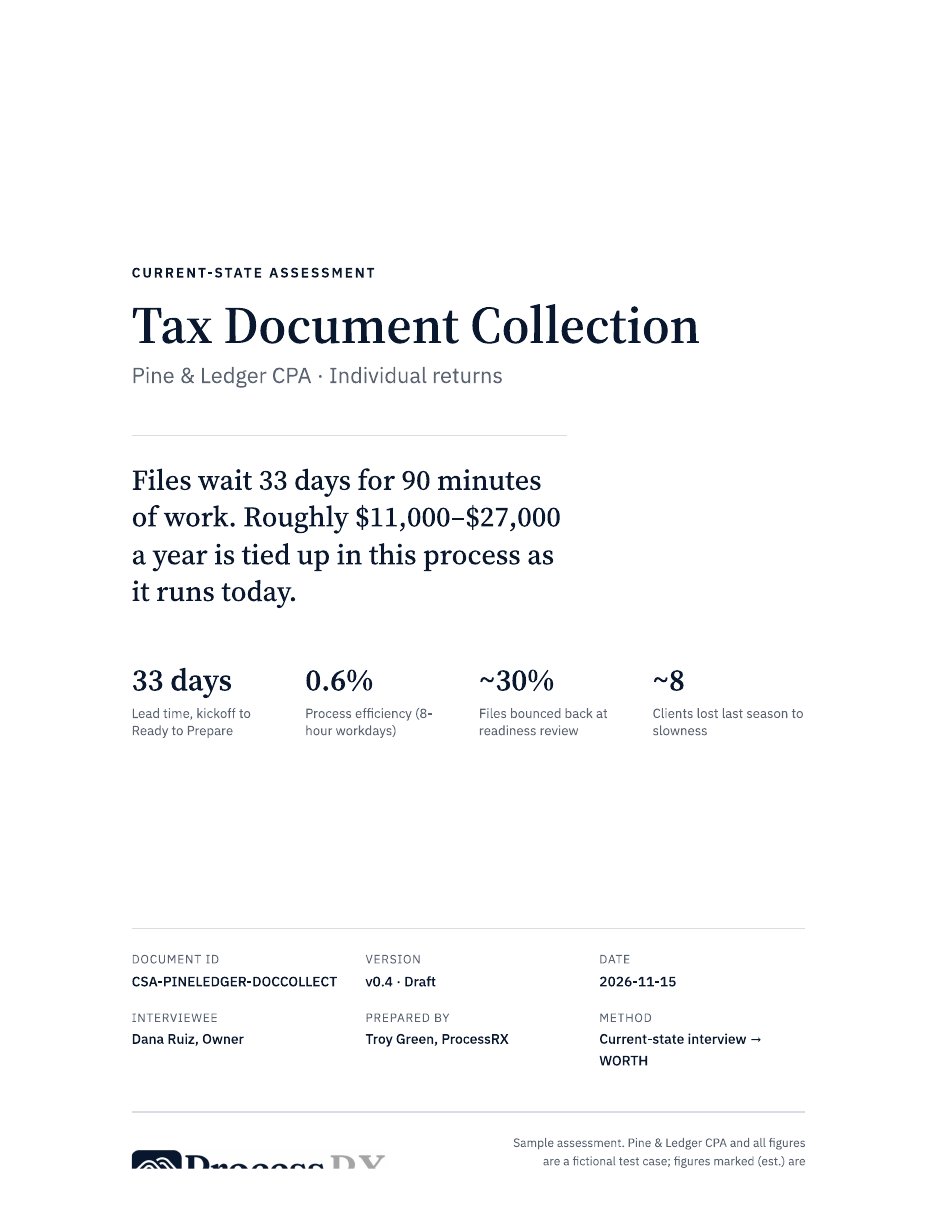
Cover
Files wait 33 days for 90 minutes of work
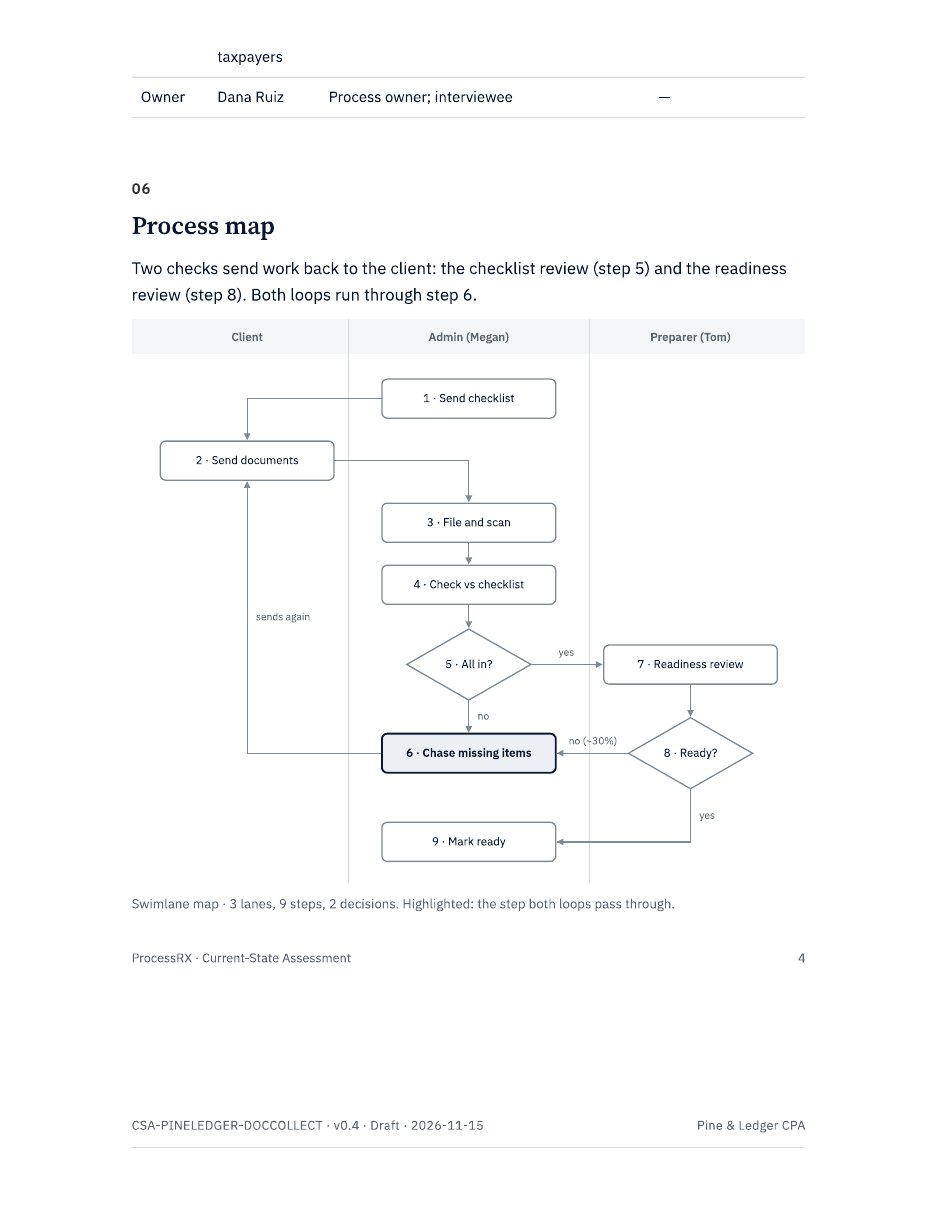
Process map
Three lanes, two loops, one shared step
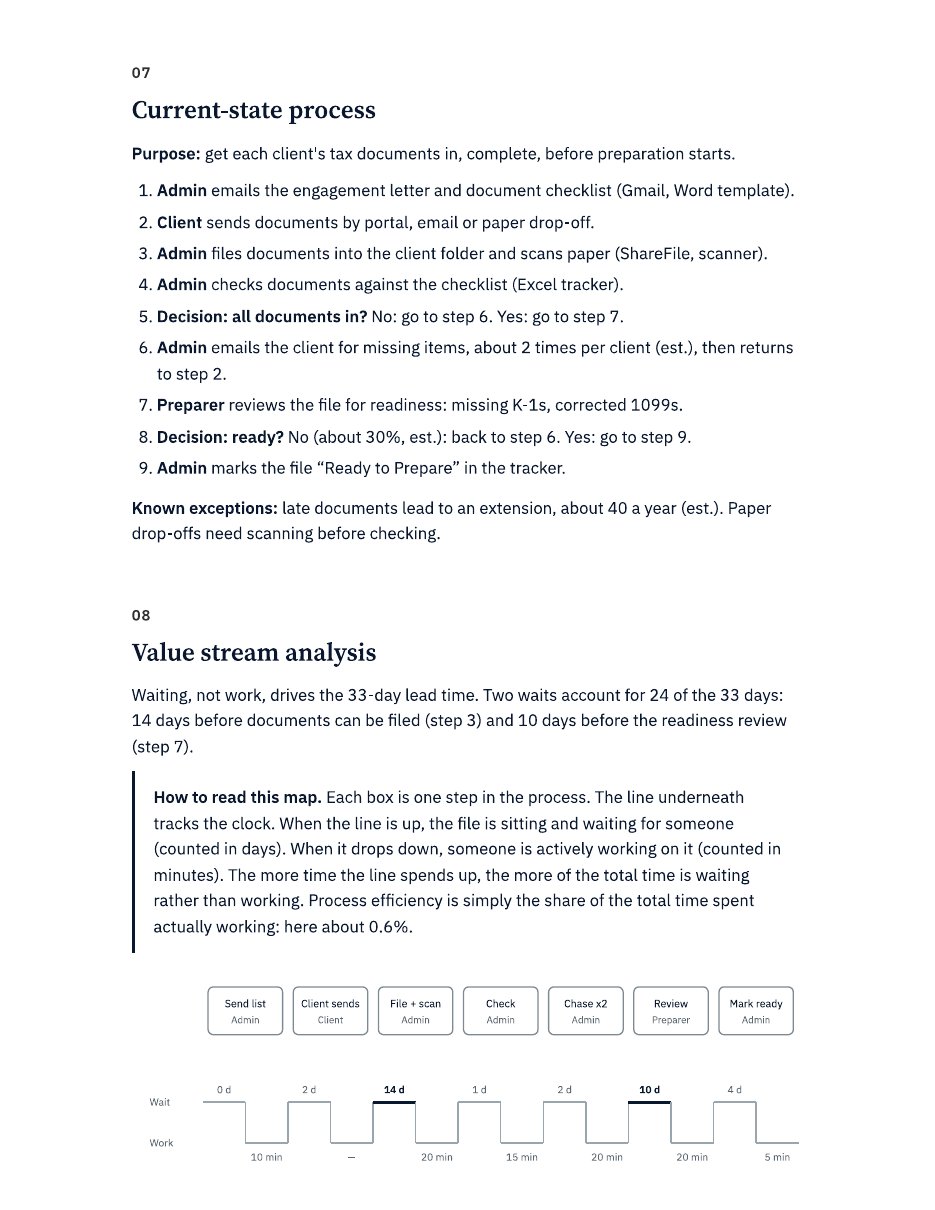
Value stream
Up means waiting. Down means working.
Source: Sample Current-State Assessment, Earn the Change. Pine & Ledger CPA is fictional.
PDF · 10 pages · 1.4 MB
Current-State Assessment: Tax Document Collection (Pine & Ledger CPA)
A few things worth looking for:
- The cover page. The whole story in one sentence: files wait 33 days for 90 minutes of work. If an owner reads nothing else, they read that.
- The process map. Three lanes, nine steps, two loops. Both loops run through the same step: chasing the client. When you see it drawn, you can’t unsee it.
- The value stream map. Each box is a step. The line underneath tracks the clock. Up means waiting. Down means working. Notice how much time the line spends up.
- The pain point log. Every complaint in the owner’s own words. “By March I feel like a bill collector” says more than any chart.
- The WORTH starting point. The obstacles ranked, the top one flagged, and three numbers to measure against before anything changes.
What you won’t find is a list of recommendations. That’s on purpose. This document describes how the work happens today, honestly, so the owner can decide what’s worth changing before anyone tries to sell them a fix.
What you can steal from this
You don’t need my skill to try this. You need about thirty minutes, one process that annoys you, and a willingness to answer honestly.
A few lessons from my Sunday:
- Capture before you fix. Every owner I’ve met wants to jump straight to the solution. But how do you know what to fix if you’ve never seen the whole thing laid out?
- Count the waiting, not just the work. Most of the pain in Pine & Ledger wasn’t slow work. It was work sitting still. Your process probably has the same secret.
- Keep their words. A quote from a frustrated employee is worth more than a page of analysis.
- Argue with the AI. The first draft is a starting point. The good stuff came from pushing back.
Here’s a starter prompt you can paste into Claude or ChatGPT tonight:
Act as an experienced business analyst. Interview me about how my [process name] works today. Ask one question at a time and wait for my answer. Use plain language. When I’m vague, ask me to walk you through the last time it happened. Capture who does each step, what tools they use, how long the work takes, and how long it waits before the next step. Note any frustrations I mention. When we’re done, play the whole process back to me, then give me a step-by-step summary, a list of pain points in my own words, and the two places where work waits the longest. Don’t suggest fixes yet.
So, what’s waiting in your business?
I started the day trying to avoid paying for a screen recorder. I ended it with an AI that interviews like a seasoned analyst and a report I’d be proud to put my name on.
But the part I keep coming back to isn’t the tool. It’s the number. Thirty-three days for ninety minutes of work.
Pine & Ledger is made up. The pattern isn’t.
Somewhere in your business there’s a file, a quote, an order, or an invoice that’s sitting still right now, waiting for someone to notice it.
How long has it been waiting? And how would you know?
If you want to see this built live, or bring your own messy process and walk through it together, join me at the next AI Show & Tell. [Sign up here.] And if you want the thinking behind WORTH and why proving something is worth doing comes before making it easy, that’s what Earn the Change is about.